Designing for trust when the stakes are a sleeping child
A 0→1 baby-monitoring experience for Wyze: B2C hardware subscription, native mobile, and on-device + cloud AI for sleep and cry context. Took the work from a one-line brief through research, MVP UX, and engineering handoff, with Phase 1 planned to ship in Q3 2026.
The brief was one sentence long.
Enter the baby monitor market. The signal was loud, but the product was nonexistent. What I inherited was the opposite of a spec. No target user. No MVP scope. No design precedent for the segment. And five established players (Nanit, Owlet, Miku, Sense-U, CuboAi) who had already defined what “good” was supposed to look like.
A $1.5B market, and 259K of our customers were already there.
The smart baby monitor category was a clean two-x growth opportunity. The more interesting signal was internal: 259,000 Wyze customers had been pointing existing indoor cameras at cribs and nurseries, building DIY baby monitoring with a generic UI and untuned alerts. The market wasn’t the question. The question was what shape Wyze’s wedge into it should take.
Six weeks. Three lenses. One thesis.
I ran research in parallel across three lenses: a competitive audit of the five players who owned the category, qualitative interviews with employee-parents, and a quantitative survey to stress-test signal at scale. Quant set the stage; qual gave it character. By the end of week six the team had a defensible thesis, not a stack of post-its.
Competitive teardown
I tore down Nanit, Owlet, Cubo Ai, Miku, and Eufy across pricing, retention loops, ML accuracy claims, and support footprint. The pattern: every premium monitor leaned on a hero AI feature — breathing detection, sleep coaching — then locked it behind a $10–$30/month subscription.
Employee-parents, deep interviews
Four colleagues with babies under two became my early panel. Two used Wyze cameras as makeshift monitors, two paid for premium competitors. The shared anxiety wasn’t feature breadth; it was second-guessing every alert at 2 a.m. Trust was the product, not the feature list.
Quantitative survey, 1,201 parents
To stress-test interview signal at scale, I ran a 1,201-respondent survey of US parents with infants under twelve months. We tested feature priority, willingness-to-pay, and trust drivers. Two answers reframed the brief: 80% wanted breathing detection, but only 41% trusted the alerts they were currently getting.
80% of parents told us they needed health emergency alerts.In practice, parents still weren’t getting that reliably from what was on the market.
The same dataset, cross-referenced with competitor reviews and our own ML accuracy benchmarks, told a different story underneath. False alerts were the #1 complaint across every competitor we studied. Breathing detection (the most-requested feature) was also the most consistently broken one in the category. Body Position accuracy in our v1 benchmark sat at 46.6%; Movement Intensity at 57.8%. Below trust thresholds.
Reliability over breadth.
From June to November 2025, the pressure was breadth: match every feature in the category. The harder bet was depth: earn parent trust on the signals the model could hold steady today, with a phased roadmap toward breathing when hardware and accuracy caught up.
Match the feature checklist.
Ship breathing detection alongside cry detection, motion alerts, and a sleep timeline. Win on parity with Nanit and Owlet. The risk: ship the same brittle ML the rest of the category was failing on, with the same 12–18% returns and customer-support load.
Ship a smaller surface — accurately.
Cut breathing detection out of MVP. Sequence it for a Phase 3 hardware refresh once we had a sensor-grade signal. Make the MVP about cry detection, sleep duration, and motion confidence — features ML could already ship at 95%+ accuracy. Trust first. Breadth later.
Three principles, applied unevenly.
Once we’d cut breadth and re-cast the MVP around trust, my engineers, PMs, and ML scientist needed simple decision rules they could apply without me in the room. Three filters made every shipped pixel arguable.
Peace of mind > feature count.
If a feature couldn’t pass the 2 a.m. test — would I trust this alert if it were my own kid crying — it didn’t ship. The MVP went out with half the features of the category and twice the confidence intervals.
Reliable > performant.
Better to show “I’m not sure yet” than be confidently wrong. Every ML output had a calibrated confidence threshold; below it, the UI degraded gracefully into observation mode instead of overclaiming.
Trustworthy > charming.
No anthropomorphic AI. No “I think your baby is sleepy.” Plain language, source attribution where the model couldn’t see, and a fast path to the raw camera feed when parents needed to see for themselves.
Twelve hours wasn’t enough.
This decision is small enough to miss, and big enough to matter. The team’s default was a 12-hour sleep chart. I argued for 24. Babies don’t sleep on a day/night schedule. They sleep in fragmented chunks across the full 24 hours, and parents need to see those chunks together to spot patterns.
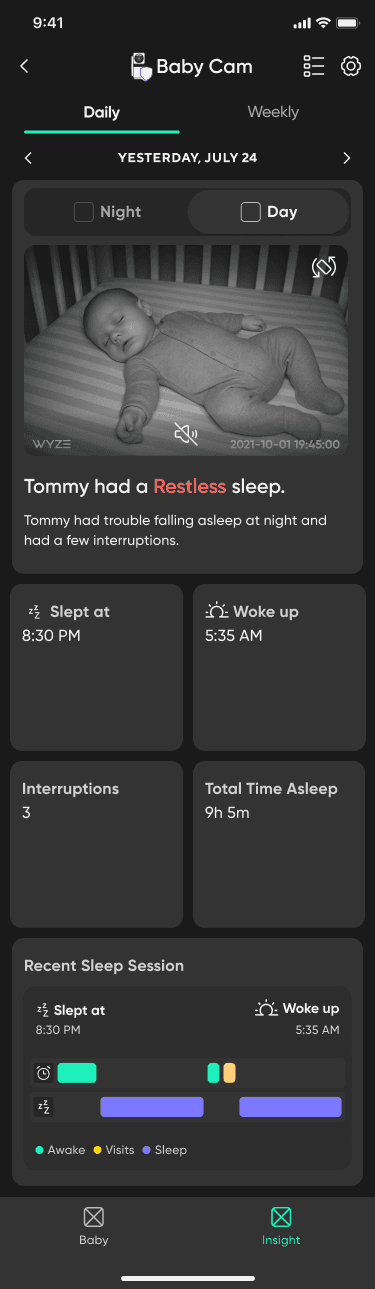
Industry standard. Most health apps use 12 hours, so it felt like the safe choice. It cut the parent’s story in half.
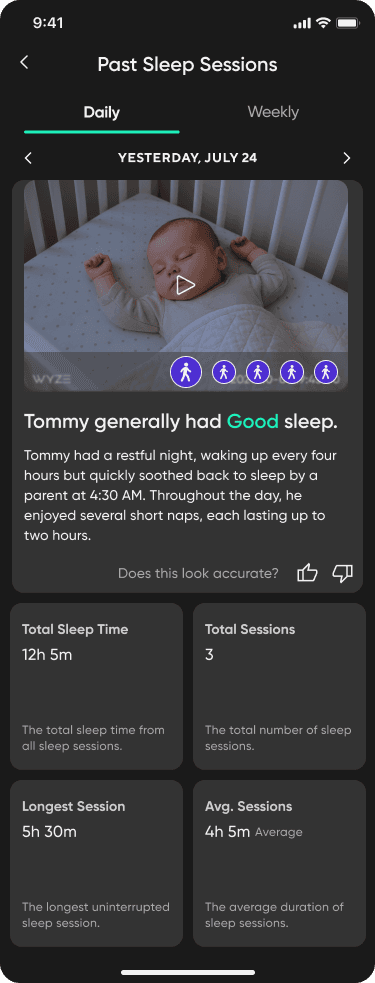
Continuous spine. Babies sleep in fragmented chunks across the full 24 hours; parents need to see those chunks together to spot patterns.
“Where’s the rest of the night?”From a parent, in nearly every usability session
Two teams, two timezones, one feature.
Work was split across two engineering teams, Seattle and Beijing, with fuzzy ownership at the seams. The camera-component crew didn’t have bandwidth for my ideal timeline, and async handoffs across twelve hours meant most decisions echoed on a next-day cycle.
I learned to map ownership before locking UI. I pivoted to a simpler timeline in V2 when the first sleep graph proved expensive. I designed one reusable alert component that folded five notification concepts into a single system the org could extend past this feature.
“Engineering constraints are design inputs, not obstacles.”
What shipped: four surfaces, one through-line.
Phase 1 focused on sleep and cry signals only, with breathing deferred until hardware could clear the same accuracy bar we used to cut it from MVP. Every surface below was iterated with the same five-parent panel across two review rounds, pressure-testing clarity at 2 a.m., not just in Figma.
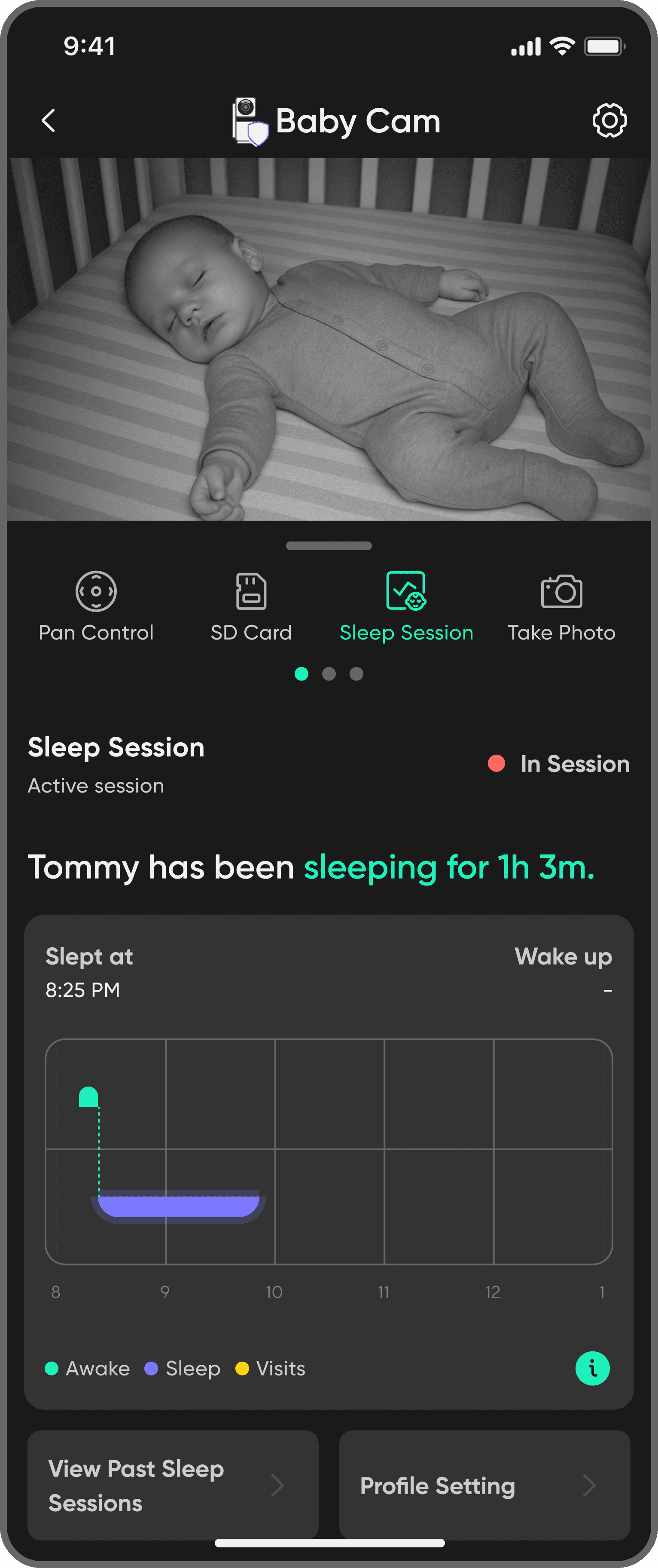
Live feed first; AI alerts stay peripheral.
Cry and motion toasts pin to the edge of the camera canvas so the baby stays the hero pixel. Parents dismiss or tap through without leaving the stream, reducing panic-mode navigation.
A full-day spine with honest confidence.
Segments span the whole 24 hours so fragmented sleep reads as one story. Confidence is one tap away; quieter styling on uncertain spans keeps the chart from sounding sure when the model isn’t.
Content language, not alarm copy.
Notifications, labels, and AI explanations are written in plain speech: readable confidence (“Pretty sure that’s a cry” / “Watching closely”), short sentences for half-awake moments, and next steps without product jargon. The goal is language parents trust at 2 a.m.—not smoke-alarm urgency or fine print.
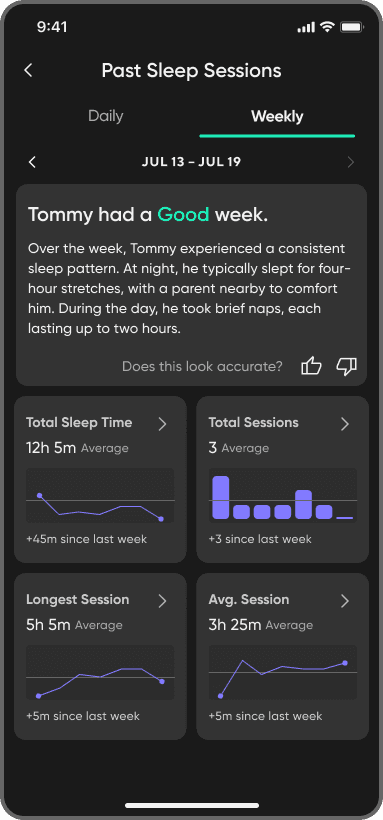
Week-over-week, not one noisy night.
The weekly summary rolls sleep into a seven-day strip: totals, where nights drifted from the usual rhythm, and pattern shifts that only show up across several days. Parents compare this week to last instead of overreacting to a single rough night.
Sizing trust while the product is in beta.
The work ended at a defensible MVP slice, a cross-functional roadmap, and attach-rate guardrails built from modeled math, not post-launch receipts. The feature is in beta testing ahead of the Q3 2026 Phase 1 window. Phase 1 still centers sleep and cry; Phase 2 expands toddler surfaces; Phase 3 layers sensor-dependent signals when hardware can meet the accuracy bar we set.
Three things I’d do differently.
By the end of the internship (November 2025), the roadmap was aligned and build was underway, with Phase 1 targeting a Q3 2026 ship. The lessons I’d hand to the next designer on a 0→1 are these three.
Test the AI patterns earlier.
I built the 24-hour timeline and the confidence disclosure separately, then tested them together. A smaller, AI-specific usability study upfront would have caught the feedback loop placement issue two weeks earlier than I did.
Bring engineering into research.
The team boundary issue was visible in week two. I didn’t loop the Seattle engineers into research synthesis until week six. That cost me two design rounds I could have skipped.
Plan for the model’s worst day.
We designed for the average case and the edge case. The case I underplanned was the bad-model-update day, when the AI gets noticeably worse before it gets better. Designing for that scenario would have made the whole interaction layer more resilient.
The piece I’m proudest of isn’t the screens. It’s the call to swap breathing detection out of the MVP. Saying no to a feature 80% of users were asking for is the kind of decision that defines whether a 0→1 product earns trust or assumes it.